<?xml version="1.0" encoding="utf-8"?><feed xmlns="http://www.w3.org/2005/Atom" ><generator uri="https://jekyllrb.com/" version="4.4.1">Jekyll</generator><link href="https://mikedanko.me/feed.xml" rel="self" type="application/atom+xml" /><link href="https://mikedanko.me/" rel="alternate" type="text/html" /><updated>2026-04-03T14:09:47+00:00</updated><id>https://mikedanko.me/feed.xml</id><title type="html">mikedanko.me</title><subtitle>This is the website for Mike Danko, a software developer in the Columbus Ohio Area. I&apos;m also a father, a radio amateur (KD8ORQ), and a musician.</subtitle><entry><title type="html">My Roll Adventure Bike</title><link href="https://mikedanko.me/general/bicycles/2025/08/17/my-bike.html" rel="alternate" type="text/html" title="My Roll Adventure Bike" /><published>2025-08-17T16:00:00+00:00</published><updated>2025-08-17T16:00:00+00:00</updated><id>https://mikedanko.me/general/bicycles/2025/08/17/my-bike</id><content type="html" xml:base="https://mikedanko.me/general/bicycles/2025/08/17/my-bike.html"><![CDATA[<p>I can’t tell you all the history, but once upon a time there was a Columbus, Ohio–based company called Roll. They started as a local bike shop that did fittings with some sort of laser machine, but eventually they got into making their own bikes. The idea was simple: build bikes people actually wanted to ride. The models were straightforward, shared similar frames, and were just plain fun. As far as I remember, none of them had a front derailleur — just seven speeds in the back.</p>

<p>My first Roll was the A:1 City, set up for just bopping around town. It was perfect for errands and short rides, but when I started pushing into 40+ mile territory, it wasn’t cutting it.</p>

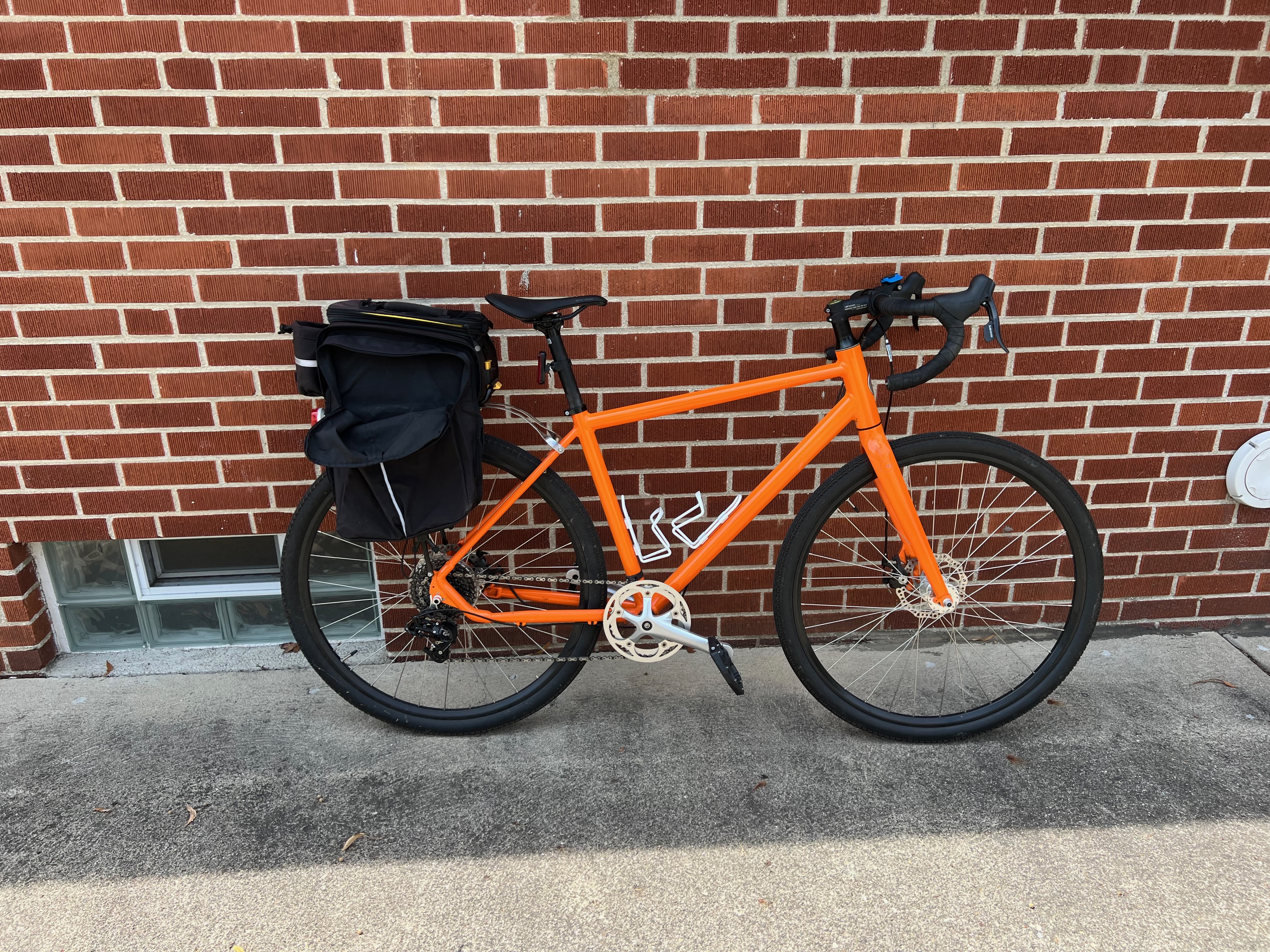
<p>So I bought their A:1 Adventure. This bike was more robust, with a wider gear range and geometry built for longer hours in the saddle. It wasn’t a race bike, or a road bike, or really a touring rig, but it could do towpaths, gravel, and still keep up on pavement. This was before gravel bikes started showing up all over YouTube. It came stock with drop bars, 700x40c tires, all the mounts you could want, mechanical disc brakes, and it was generally a tank.</p>

<p><img src="/assets/images/bike/IMG_5363.jpeg" alt="My Roll Adventure Bike" /></p>

<p>And I should say — it <em>is</em> a tank. Mine has slowly become a bit of a frankenbike, but on purpose. I’ve been through many saddles but finally landed on the Bontrager Aeolus Comp in 155mm. Yes, it’s marketed as an aero saddle, but on this frame it feels right — both upright and in the drops.</p>

<p>The pedals had to go too. Stock pedals are always just for show. I swapped in Crankbrothers Stamp 1 Gen 2 (large), which suit me better. I am PROUDLY not a “cyclist,” but I love riding bikes. None of mine require me to dress up to ride — though I won’t say no to padded shorts.</p>

<p>Next up: Panaracer GravelKing SS+ tires. Believe it or not, I’m still on the stock rubber years later.</p>

<p>And if you spotted the Quadlock mount on the bars: yeah, regret. The mount itself works, but the cases are expensive and I haven’t had one last a season — they warp under UV and weather, even with me riding only 3 days a week. I’ll probably switch to Peak Design at some point.</p>

<p>It’s not the lightest, it’s not the newest, but it’s mine. And every time I throw a leg over it, I’m glad I didn’t let this one slip away when Roll closed up shop. I miss everyone in the Lane Ave store but still see them around town and this is a great reminder of all those people who made that happen.</p>

<p>For a while, Roll bikes were everywhere around Columbus (and even a bit in Chicago and Cincinnati), but they’ve faded from the landscape since the company folded. Every now and then I still spot one locked up outside a coffee shop or rolling down a trail, and it feels like seeing a little piece of local bike history. I’ve got two of them, and I’m glad I do — they’re reminders that the best bike is the one you keep reaching for, long after the brand has disappeared.</p>]]></content><author><name></name></author><category term="general" /><category term="bicycles" /><summary type="html"><![CDATA[I can’t tell you all the history, but once upon a time there was a Columbus, Ohio–based company called Roll. They started as a local bike shop that did fittings with some sort of laser machine, but eventually they got into making their own bikes. The idea was simple: build bikes people actually wanted to ride. The models were straightforward, shared similar frames, and were just plain fun. As far as I remember, none of them had a front derailleur — just seven speeds in the back.]]></summary></entry><entry><title type="html">This sentence</title><link href="https://mikedanko.me/general/2025/07/02/this-sentence.html" rel="alternate" type="text/html" title="This sentence" /><published>2025-07-02T23:12:00+00:00</published><updated>2025-07-02T23:12:00+00:00</updated><id>https://mikedanko.me/general/2025/07/02/this-sentence</id><content type="html" xml:base="https://mikedanko.me/general/2025/07/02/this-sentence.html"><![CDATA[<p>I do not hate this sentence.</p>

<p>This is an exercise.</p>]]></content><author><name></name></author><category term="general" /><summary type="html"><![CDATA[I do not hate this sentence.]]></summary></entry><entry><title type="html">KiwiSDR Project Part 6: Final Thoughts</title><link href="https://mikedanko.me/radio/2025/06/30/kiwisdr-project-pt6-final-thoughts.html" rel="alternate" type="text/html" title="KiwiSDR Project Part 6: Final Thoughts" /><published>2025-06-30T00:00:00+00:00</published><updated>2025-06-30T00:00:00+00:00</updated><id>https://mikedanko.me/radio/2025/06/30/kiwisdr-project-pt6-final-thoughts</id><content type="html" xml:base="https://mikedanko.me/radio/2025/06/30/kiwisdr-project-pt6-final-thoughts.html"><![CDATA[<h1 id="review">Review</h1>
<p>It was certainly interesting to throw the KiwiSDR project together. Now that it’s almost a year later I definitely have some thoughts on this.</p>

<p>If you haven’t read, I have a five part set of posts about how I got it working.</p>

<ul>
  <li><a href="/radio/2024/08/23/kiwisdr-project-pt1.html">KiwiSDR Part 1</a></li>
  <li><a href="/radio/2024/08/24/kiwisdr-project-pt2.html">KiwiSDR Part 2</a></li>
  <li><a href="/radio/2024/09/04/kiwisdr-project-pt3.html">KiwiSDR Part 3</a></li>
  <li><a href="/radio/2024/09/06/kiwisdr-project-pt4.html">KiwiSDR Part 4</a></li>
  <li><a href="/radio/2024/09/07/kiwisdr-project-pt5.html">KiwiSDR Part 5</a></li>
</ul>

<p>Here’s what ended up in the garage:</p>

<ul>
  <li><a href="http://www.kiwisdr.com">KiwiSDR</a> v1 - <a href="http://kiwisdr.com/info/">Operating Information Guide</a></li>
  <li><a href="https://www.w6lvp.com">W6LVP Receive Only Magloop</a></li>
  <li><a href="https://www.digikey.com/en/products/detail/mean-well-usa-inc/GST25A05-P1J/7703645?s=N4IgTCBcDaIOIGUAqYCsBBADKgtABQEYApEAXQF8g">Mean Well, 5V 4A, 2.1mm plug, 85 - 264 VAC IEC C14 input connector</a></li>
  <li><a href="https://turnislandsystems.com/sdr-front-end-filter/">Turn Island Systems 30 MHz Low-pass filter</a></li>
  <li><a href="https://samsontech.com/products/studio-tools/powerbrite/powerbrite/">Samson PowerBrite PB9</a></li>
</ul>

<p>I am very happy I took the time to do all this. I struggled with aspects of RF, networking, and general placement but learned a lot about all those things. I know what I would do different next time now.</p>

<p>The entire setup is truly remarkable, considering it’s a full-fledged internet appliance, especially considering its price point. It is a very good thing, it is just not for me.</p>

<p>When I first laid eyes on the KiwiSDR, I was completely blown away by its capabilities. Tuning in to signals from DC to 30 MHz was impressive, analyzing the waterfall for all of it was awe-inspiring, and decoding digital signals in a single package was mind-boggling at the time. There’s some great engineering in there for what this thing is.</p>

<p>But as I said, there are aspects that didn’t quite work for me.</p>

<h3 id="not-for-me-1-my-home-internet">Not for Me #1: My Home Internet</h3>

<p>The first issue actually had nothing to do with the SDR itself, but with what I learned setting it up. I’ve had T-Mobile Home Internet for a while, and honestly, it’s been great: fast, easy to set up (just put it by a window), and way more reliable and cheaper than my old Spectrum connection. As an existing T-Mobile customer, I even get an extra discount.</p>

<p>But after working through the RF and networking headaches, I ran into a bigger problem: T-Mobile uses CGNAT (Carrier Grade NAT), which means I don’t get a public IP address at home. To access the KiwiSDR remotely, I had to jump through a lot of hoops.</p>

<p>My options were:</p>

<ul>
  <li>Set up some kind of reverse proxy on the BeagleBone Black itself (not really practical given its specs)</li>
  <li>Use the built-in reverse proxy service, but the documentation is lacking and, given other issues I’ll get into later, it wasn’t appealing</li>
  <li>Funnel traffic through a service I control in the cloud or on other hardware at home</li>
</ul>

<p>I went with option #3: I put a Raspberry Pi on my home network, set up nginx as a reverse proxy, and used Tailscale Funnel on the Pi to route traffic to the KiwiSDR. It works, but it’s fragile. If any piece of that chain fails, things break, and now there are just too many moving parts to troubleshoot easily.</p>

<p>I may revisit my home internet setup, since there are now faster providers in my neighborhood that actually offer a public IP. That would make remote access a lot more straightforward if I ever want to pick up projects like the KiwiSDR again. Still, the internet issue was only one piece of the puzzle; there are a few other hurdles I’d have to address before I’d consider jumping back in.</p>

<h3 id="not-for-me-2-its-a-complete-package">Not for Me #2: It’s a Complete Package</h3>

<p>Looking back, most of the headaches I had with the KiwiSDR were learning experiences or just the reality of setting up any sensitive RF gear. The bigger issue is more fundamental: the KiwiSDR is a radio for radio people, not for computer people. It’s built to be a turnkey appliance: just plug it in and you’re supposed to be on the air.</p>

<p>But as someone who thinks in terms of networks, operating systems, and security, the “complete package” approach started to feel like a liability. The software is closed, the platform is opaque, and there have been real-world security incidents (<a href="https://arstechnica.com/gadgets/2021/07/for-years-a-backdoor-in-popular-kiwisdr-product-gave-root-to-project-developer/" target="_blank">like this one on Ars Technica</a>). That’s just not something I’m comfortable plugging into my network for the long term. I don’t want root-level mystery code running 24/7 in my garage.</p>

<p>This isn’t just a minor quibble; it’s a philosophical mismatch. The project makes a lot of sense for people who want to use a radio, not run a secure server. But if you’re coming at it as a computer person—someone who wants to control, audit, or tinker with the underlying system—you’re going to run into friction, and possibly even a little distrust.</p>

<h3 id="not-for-me-3-too-integrated-too-limited-for-power-users">Not for Me #3: Too Integrated, Too Limited for Power Users</h3>

<p>I quickly discovered that KiwiSDR’s “all-in-one” web interface is great for beginners, but crippling once you want real flexibility. If you want to stream audio or IQ data outside that browser, you’re stuck with third-party hacks, command-line wrappers, or reverse engineering efforts. For instance, achieving live audio output requires using a remote WebSocket client like <code class="language-plaintext highlighter-rouge">kiwi_nc.py</code> or <code class="language-plaintext highlighter-rouge">kiwisound.py</code>—none of which are officially documented or tightly integrated.</p>

<p>Meanwhile, the built-in UI is simply not built for power users: trying to automate access, batch-record streams, or integrate with custom DSP workflows meant either reverse engineering the undocumented WebSocket API or leaning on fragile, third-party tools that may not support frequency hopping or “camping” on channels.</p>

<p><strong>Bottom line:</strong> KiwiSDR feels like it’s for people who want a radio appliance on their network, not for those who want a radio tool they can truly <em>build with</em>. If you’re a computer person who wants open, documented APIs, modular workflows, or deep automation, this is a fundamental mismatch.</p>

<h3 id="my-next-sdr-setup">My Next SDR Setup</h3>

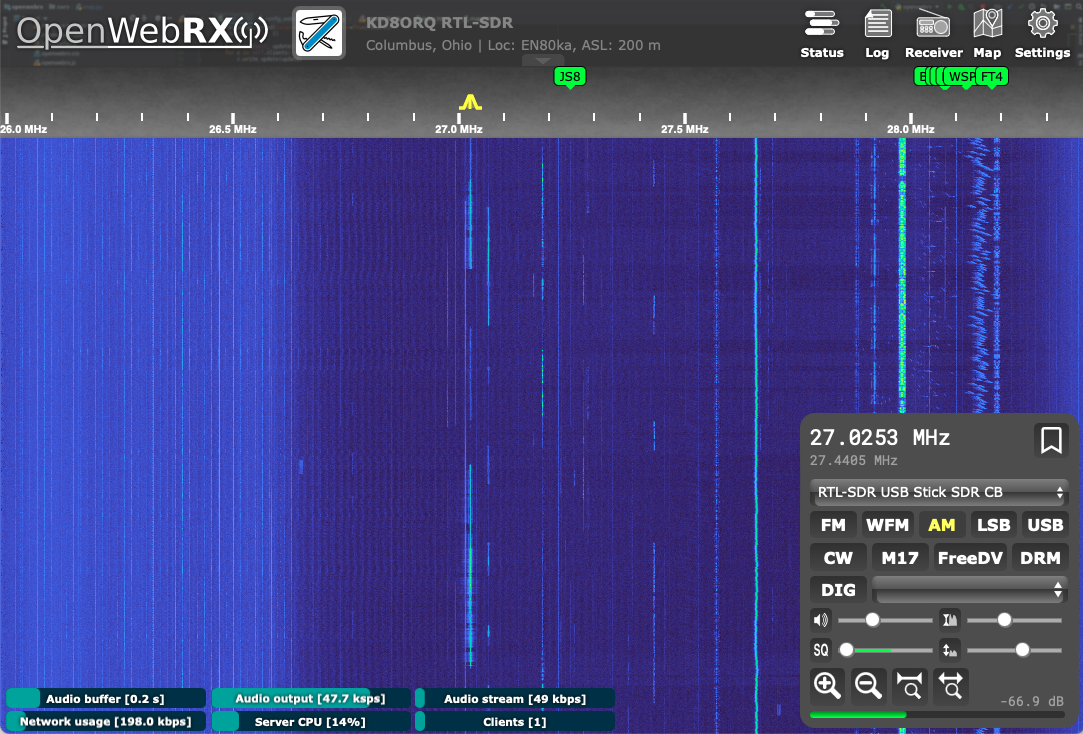
<p>Moving forward, I think what I really want is an SDR setup that’s decoupled from the rest of the system. I’d much rather use hardware that simply delivers raw IQ data, and then run my own server (like OpenWebRx) on hardware I control. That way, I get full transparency, the ability to audit or tweak the stack as I see fit, and the flexibility to swap out software as new tools emerge. Basically, I want a system where the radio is just a radio, and the computing is just computing—no black boxes, no closed firmware, and no appliances I have to trust by default. The KiwiSDR is an impressive “all-in-one,” but I’d rather have more control and fewer unknowns.</p>]]></content><author><name></name></author><category term="radio" /><category term="radio" /><summary type="html"><![CDATA[Review It was certainly interesting to throw the KiwiSDR project together. Now that it’s almost a year later I definitely have some thoughts on this.]]></summary></entry><entry><title type="html">Back to Jekyll</title><link href="https://mikedanko.me/general/2025/06/28/back-to-jekyll.html" rel="alternate" type="text/html" title="Back to Jekyll" /><published>2025-06-28T00:00:00+00:00</published><updated>2025-06-28T00:00:00+00:00</updated><id>https://mikedanko.me/general/2025/06/28/back-to-jekyll</id><content type="html" xml:base="https://mikedanko.me/general/2025/06/28/back-to-jekyll.html"><![CDATA[<p>I tried the whole “everything in one place” note-taking experiment for a while. Obsidian, second brain, Zettelkasten, whatever you want to call it. There are plenty of nerds on the internet who will tell you it’s the answer to all your problems if you just get enough plugins and hotkeys sorted out. I bought in for a bit.</p>

<p>It didn’t do much for me. At least, not in the way people seem to promise.</p>

<p>For meeting notes, Agenda.app works better. I don’t need to explain it—calendar, notes, decent search, and it’s designed for meetings, not for people who want to build a private wiki about their lives.</p>

<p>Obsidian is fine for longer stuff or project notes. But dumping everything in there just made a mess. Instead of having lots of places to lose track of things, I just had one big one. The “second brain” just became a bigger, dumber version of the first.</p>

<p>Obsidian Publish was supposed to make it easy to share some notes online, but it turns out I barely remembered it existed most of the time. It costs more than it should, can’t really handle multiple domains, and you don’t get much control over how things are published. If you’re used to tweaking your own static site, it feels like going backwards.</p>

<p>The other problem, and this is one I don’t see talked about much, is that all the content I had on Obsidian Publish made for a terrible blog. It wasn’t structured as posts. Formatting was all over the place. Most of it was unfinished, or personal, or just not something anyone else should ever see. If I want to bring anything over to Jekyll, it’s going to be a project. I’ll have to pick through, see if anything’s worth saving, and clean it up before it even resembles a blog post. Most of it probably won’t make the cut.</p>

<p>So, back to Jekyll. I write in Markdown, I push to GitHub, and the site updates. I point whatever domains I want at it, set things up how I like, and don’t have to think about monthly subscriptions or if some new app is about to break my workflow. It’s not magic, but it works, and it’s not pretending to be anything more than a pile of text files and some templates.</p>

<p>I’m sure I’ll get annoyed with this setup eventually and try something else. But for now, this is good enough.</p>]]></content><author><name></name></author><category term="general" /><summary type="html"><![CDATA[I tried the whole “everything in one place” note-taking experiment for a while. Obsidian, second brain, Zettelkasten, whatever you want to call it. There are plenty of nerds on the internet who will tell you it’s the answer to all your problems if you just get enough plugins and hotkeys sorted out. I bought in for a bit.]]></summary></entry><entry><title type="html">KiwiSDR Project Part 5</title><link href="https://mikedanko.me/radio/2024/09/07/kiwisdr-project-pt5.html" rel="alternate" type="text/html" title="KiwiSDR Project Part 5" /><published>2024-09-07T00:00:00+00:00</published><updated>2024-09-07T00:00:00+00:00</updated><id>https://mikedanko.me/radio/2024/09/07/kiwisdr-project-pt5</id><content type="html" xml:base="https://mikedanko.me/radio/2024/09/07/kiwisdr-project-pt5.html"><![CDATA[<p>Well hell. The documentation for the reverse proxy for the Kiwi does not exist and the UI’s explanation is completely lacking. Fine, I’d much rather have this under my control anyway. But I ran into a snag with my home Internet service.</p>

<p>I absolutely love having T-Mobile’s 5G home internet service. It’s got a great price point, outages have been non-existent (no wires!), it’s fast with low latency and it was cheaper and faster than cable here. I just ran across my first snag with the service through — there’s absolutely no settings on it. Meaning, I can’t turn on u-pnp or make a NAT for the SDR so I can access it remotely. There are<a href="https://forum.kiwisdr.com/index.php?p=/discussion/3005/tailscale-install-on-kiwi"> reports of running Tailscale directly on the device</a>, but there are reasons I don’t want to do that:</p>

<ul>
  <li>The Beaglebone is already often running at high CPU utilization. The Kiwi server code has realtime requirements (per the comment from the guy that made it in the link above) and it could be a problem.</li>
  <li>I’d rather not screw around with dynamic DNS clients.</li>
</ul>

<p>So I already have a Tailnet from <a href="[https://tailscale.com](https://tailscale.com/)">Tailscale</a> on most of the devices I own and it would make it possible for me to put up a reverse proxy in the cloud, route it into the home network and straight to the KiwiSDR’s private address. This ended up being much easier than that. It was as simple as setting up a reverse proxy from a raspberry pi directly wired to the AP to proxy to the KiwiSDR and running <code class="language-plaintext highlighter-rouge">tailscale funnel 80</code> on the raspberry pi.</p>

<p>I’m now in the directory! Project completed.</p>

<p><img src="/assets/images/kiwisdr/Pasted image 20240907161609.png" alt="KiwiSDR Listing" /></p>

<p>Well, as much as I can be done with it. It’s a very noisy day electrically and I feel like I’ll constantly be adjusting things, but I’m done with all the hard stuff for now.</p>

<p>However…</p>

<p>I have been experiencing issues with network connectivity, or at least it seems like I have. Often the waterfall will stutter and audio will drop. The Wifi signal is usually hanging out ~ 50% quality so I’ve ordered a higher gain, directional, outdoor antenna for the thing. I’ve noticed in the system log that it tends to range a lot, so I’m hoping that at least that can be stopped.</p>

<p>I never wanted to be a guy that had <code class="language-plaintext highlighter-rouge">node_exporter</code> installed on machines in his house and my own Grafana/Prometheus setup, but I really don’t see many other ways to try and solve some of the issues I’m having. I mostly don’t want to do this because it’s what I do for a living and it is a bad thing to do the same thing for your hobby that you do for a living.</p>

<p>The new antenna should arrive tomorrow, if it’s remarkably better I’ll consider it a success, otherwise I feel like this is going to turn into a data center.</p>

<p>I am still having problems with noise and I feel like this may be related to my antenna choice. Yes, I need to get a better ferrite setup for the thing, but while the noise is still much better than it was, it’s still not great. I’m going to try and solve the networking problems first because it’s extremely frustrating to try and solve the RF problems when you can’t get the waterfall working or the thing has gone completely offline. I may look into an antenna switcher and maybe something like a long wire since I nearly have the space for it.</p>

<p>After the 15dBi directional WiFi antenna arrived a few days ago, which replaces the 7dBi omnidirectional antenna. Due to an appendectomy getting in the way, I just got it installed last night. The new antenna is only temporarily setup, as it didn’t come with all the mounting hardware it needed to come with, but it’s a fix. According to <code class="language-plaintext highlighter-rouge">wavemon</code> the signal is just 5-10% better but the drop outs are totally gone.</p>]]></content><author><name></name></author><category term="radio" /><category term="radio" /><summary type="html"><![CDATA[Well hell. The documentation for the reverse proxy for the Kiwi does not exist and the UI’s explanation is completely lacking. Fine, I’d much rather have this under my control anyway. But I ran into a snag with my home Internet service.]]></summary></entry><entry><title type="html">KiwiSDR Project Part 4</title><link href="https://mikedanko.me/radio/2024/09/06/kiwisdr-project-pt4.html" rel="alternate" type="text/html" title="KiwiSDR Project Part 4" /><published>2024-09-06T00:00:00+00:00</published><updated>2024-09-06T00:00:00+00:00</updated><id>https://mikedanko.me/radio/2024/09/06/kiwisdr-project-pt4</id><content type="html" xml:base="https://mikedanko.me/radio/2024/09/06/kiwisdr-project-pt4.html"><![CDATA[<p>Ok! So I’ve powered up the noisy as heck wifi bridge but also plugged in the USB wifi adapter with a 8dB antenna attached. I’m going to try to get the adapter working from the comfort of inside the house then go power down everything attached to the ethernet, especially the bridge because it is VERY noisy in the environment even when it’s not plugged into anything but power.</p>

<p>So first things first, let’s see what’s on the USB bus:</p>

<div class="language-shell-session highlighter-rouge"><div class="highlight"><pre class="highlight"><code><span class="gp">debian@kiwisdr:~$</span><span class="w"> </span>lsusb
<span class="go">-bash: lsusb: command not found
</span></code></pre></div></div>

<p>Well that’s no good, but expected. Let’s install USB utils so we can take a look</p>

<div class="language-shell-session highlighter-rouge"><div class="highlight"><pre class="highlight"><code><span class="gp">debian@kiwisdr:~$</span><span class="w"> </span><span class="nb">sudo </span>apt <span class="nb">install </span>usbutils
</code></pre></div></div>
<p>After installing usbutils, we’ll see what’s on the USB bus and install the appropriate firmware.</p>

<div class="language-shell-session highlighter-rouge"><div class="highlight"><pre class="highlight"><code><span class="gp">debian@kiwisdr:~$</span><span class="w"> </span>lsusb
<span class="go">Bus 001 Device 002: ID 0cf3:9271 Qualcomm Atheros Communications AR9271 802.11n
Bus 001 Device 001: ID 1d6b:0002 Linux Foundation 2.0 root hub

</span><span class="gp">debian@kiwisdr:~$</span><span class="w"> </span>apt search atheros
<span class="go">Sorting... Done
Full Text Search... Done
firmware-atheros/unknown 20170823-1rcnee1~jessie+20180328 all
  Binary firmware for Atheros wireless cards

</span><span class="gp">debian@kiwisdr:~$</span><span class="w"> </span><span class="nb">sudo </span>apt <span class="nb">install </span>firmware-atheros
</code></pre></div></div>

<p>Ok, so let’s install some tools for wireless networking.</p>

<div class="language-shell-session highlighter-rouge"><div class="highlight"><pre class="highlight"><code><span class="gp">debian@kiwisdr:~$</span><span class="w"> </span><span class="nb">sudo </span>apt <span class="nb">install </span>iw wireless-tools wpasupplicant wavemon
</code></pre></div></div>

<p>Now at this point I could go outside and unplug and re-plug the USB adapter, but it’s hot and gross so I’ll reboot and log back in. After that:</p>

<div class="language-shell-session highlighter-rouge"><div class="highlight"><pre class="highlight"><code><span class="gp">debian@kiwisdr:~$</span><span class="w"> </span>ip <span class="nb">link</span>
<span class="gp">1: lo: &lt;LOOPBACK,UP,LOWER_UP&gt;</span><span class="w"> </span>mtu 65536 qdisc noqueue state UNKNOWN mode DEFAULT group default qlen 1
<span class="go">    link/loopback 00:00:00:00:00:00 brd 00:00:00:00:00:00
</span><span class="gp">2: eth0: &lt;BROADCAST,MULTICAST,UP,LOWER_UP&gt;</span><span class="w"> </span>mtu 1500 qdisc pfifo_fast state UP mode DEFAULT group default qlen 1000
<span class="go">    link/ether e4:15:f6:f7:4d:a8 brd ff:ff:ff:ff:ff:ff
</span><span class="gp">3: wlan0: &lt;BROADCAST,MULTICAST&gt;</span><span class="w"> </span>mtu 1500 qdisc noop state DOWN mode DEFAULT group default qlen 1000
<span class="go">    link/ether e8:de:27:09:0a:55 brd ff:ff:ff:ff:ff:ff
</span><span class="gp">4: usb0: &lt;NO-CARRIER,BROADCAST,MULTICAST,UP&gt;</span><span class="w"> </span>mtu 1500 qdisc pfifo_fast state DOWN mode DEFAULT group default qlen 1000
<span class="go">    link/ether e4:15:f6:f7:4d:a0 brd ff:ff:ff:ff:ff:ff
</span></code></pre></div></div>

<p>Sweet! <code class="language-plaintext highlighter-rouge">wlan0</code> is alive, but down! Let’s bring it up so we can look at the spectrum / networks:</p>

<div class="language-shell-session highlighter-rouge"><div class="highlight"><pre class="highlight"><code><span class="gp">debian@kiwisdr:~$</span><span class="w"> </span><span class="nb">sudo </span>ip <span class="nb">link set </span>wlan0 up
</code></pre></div></div>

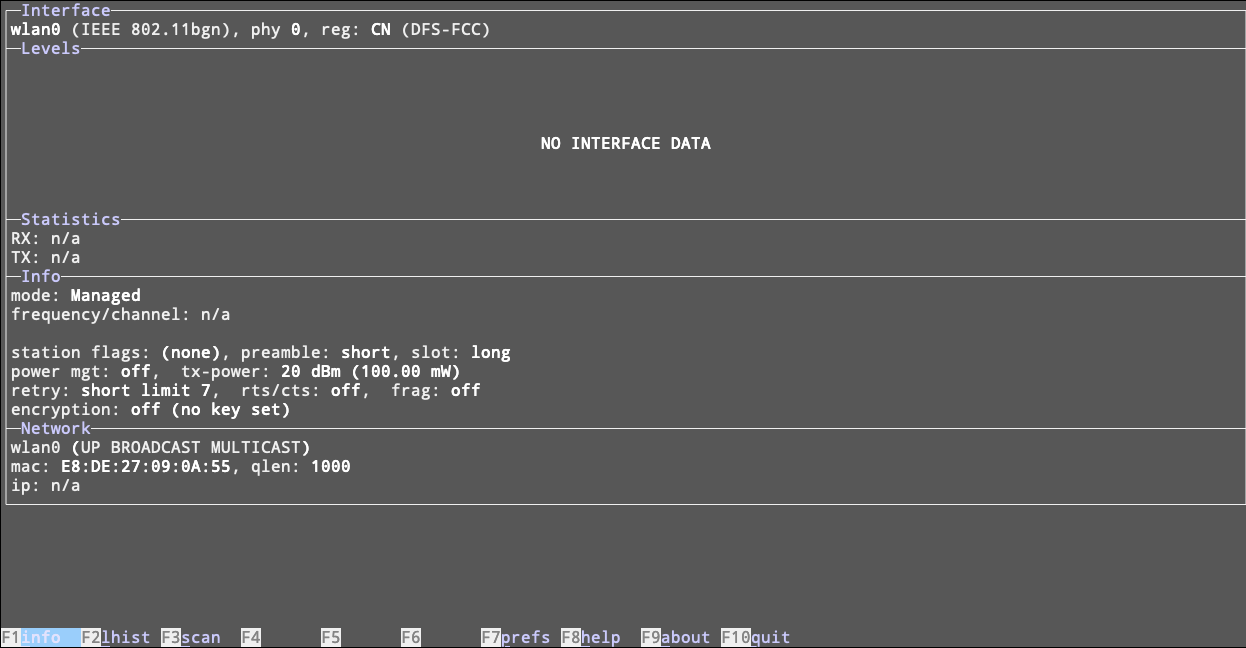
<p>Now we should be able to use <code class="language-plaintext highlighter-rouge">wavemon</code> to scan for networks. <code class="language-plaintext highlighter-rouge">wavemon</code> is an ncurses based way to more conveniently browse wireless networks. We’ll run <code class="language-plaintext highlighter-rouge">sudo wavemon</code> and check things out.</p>

<p><img src="/assets/images/kiwisdr/Pasted image 20240906100506.png" alt="Wavemon on KiwiSDR" /></p>

<p>Ok, so nothing yet, we’ll have to hit <code class="language-plaintext highlighter-rouge">F3</code> and initiate a scan:</p>

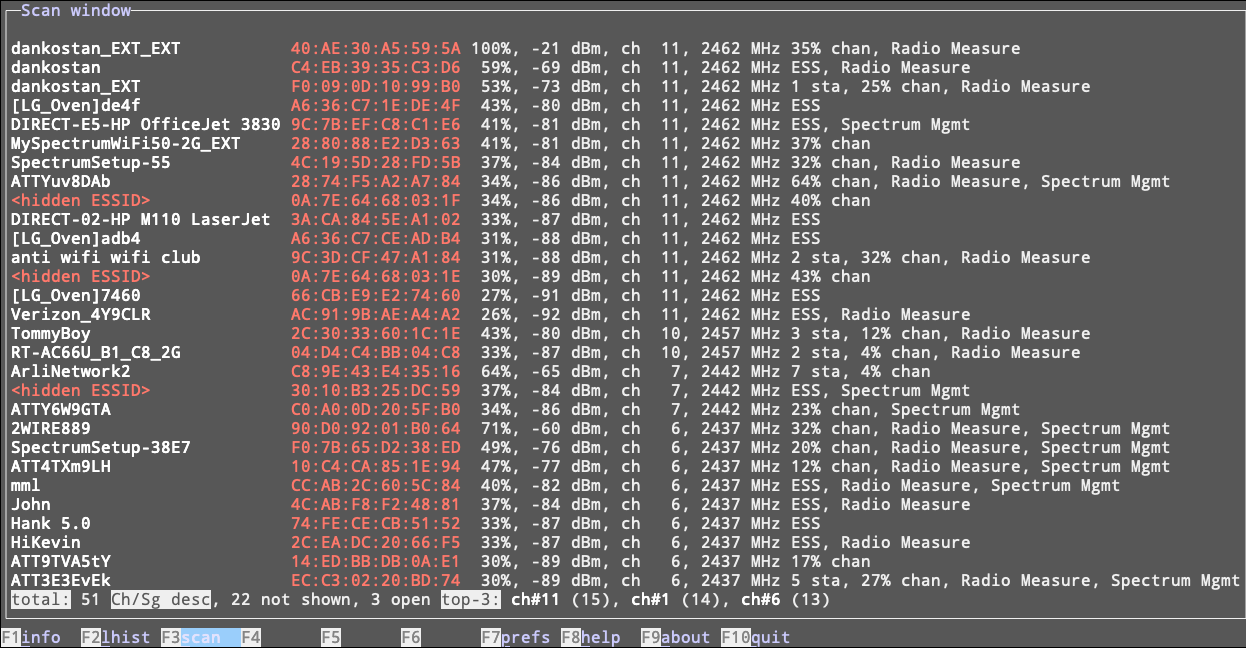
<p><img src="/assets/images/kiwisdr/Pasted image 20240906100608.png" alt="Wavemon Scan on KiwiSDR" /></p>

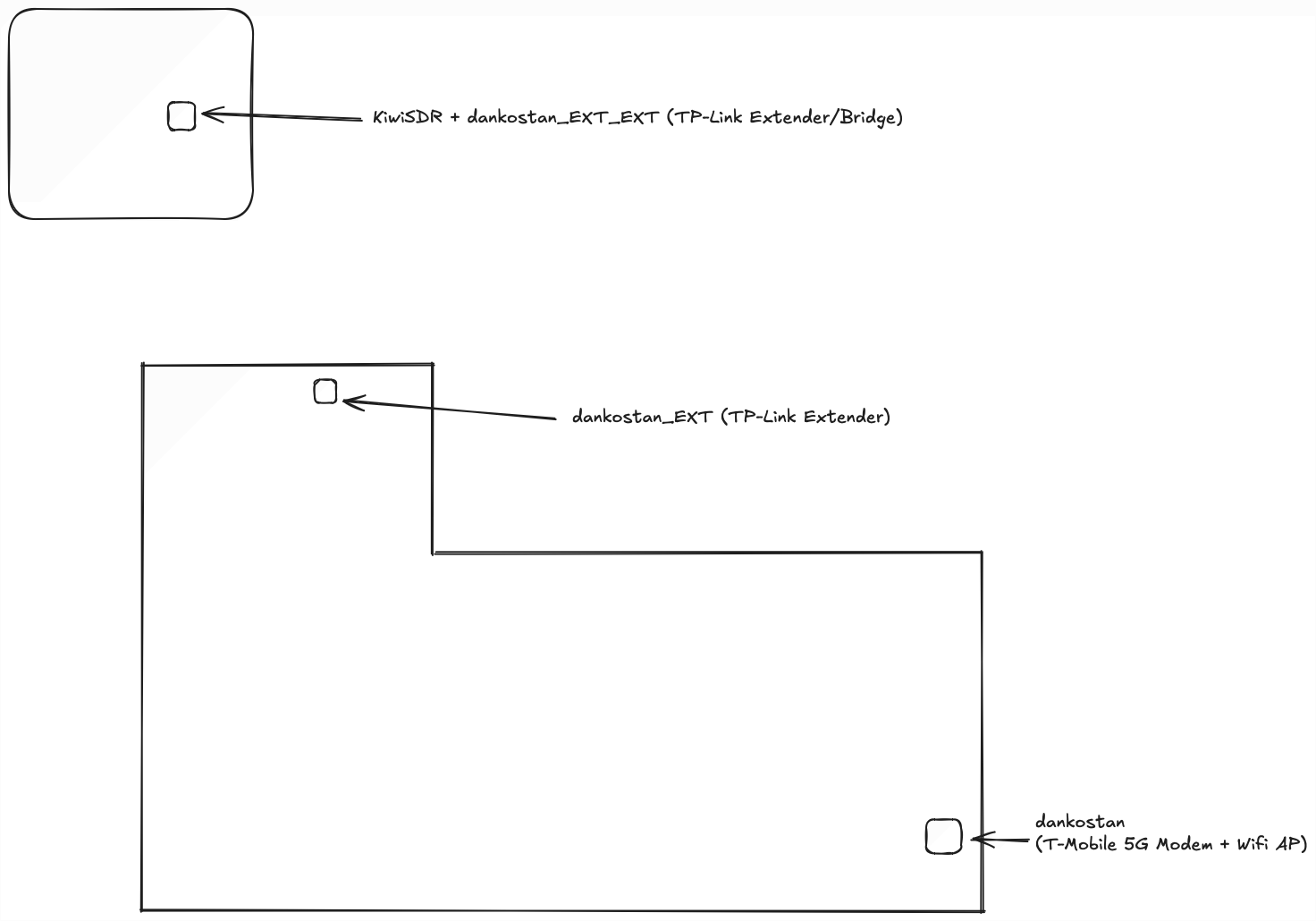
<p>So this is where it’s wild. Let’s explore with a not-to-scale KD8ORQ home diagram:</p>

<p><img src="/assets/images/kiwisdr/Untitled-2024-09-06-1017.png" alt="KD8ORQ Home Diagram" /></p>

<p>The <code class="language-plaintext highlighter-rouge">dankostan_EXT</code> extender was installed because the extender in the garage didn’t get enough signal to connect to the modem in the front of the house. According to <code class="language-plaintext highlighter-rouge">wavemon</code>, the USB stick+antenna averages a 10dB better signal than the intermediary extender (dankostan_EXT) I was intending to use. So we’ll setup the KiwiSDR to use the original AP in the front of the house and once the Wifi is working on the KiwiSDR, all the extenders can be removed[^1]!</p>

<p>I was about to edit <code class="language-plaintext highlighter-rouge">/etc/network/interfaces</code> to bring up the wireless interface, but according to a comment in it, I should be using <code class="language-plaintext highlighter-rouge">connman</code> to manage the network connection. So…</p>

<div class="language-shell-session highlighter-rouge"><div class="highlight"><pre class="highlight"><code><span class="gp">debian@kiwisdr:/etc/network$</span><span class="w"> </span><span class="nb">sudo </span>apt <span class="nb">install </span>connman
</code></pre></div></div>

<p>And the network drops. The device is no longer ping-able, etc. The screen stopped updating when connman was 80% of the way through being installed. So let’s go power cycle the thing after a good wait to ensure the apt operation completed. I thought something might happen with both interfaces being live on the same network, but we haven’t even set the thing up yet.</p>

<p>Everything was fine after the power cycle and connman was installed. Let’s make sure it runs at startup:</p>

<div class="language-shell-session highlighter-rouge"><div class="highlight"><pre class="highlight"><code><span class="gp">debian@kiwisdr:~$</span><span class="w"> </span><span class="nb">sudo </span>systemctl <span class="nb">enable </span>connman
<span class="gp">debian@kiwisdr:~$</span><span class="w"> </span><span class="nb">sudo </span>systemctl start connman
</code></pre></div></div>

<p>Let’s run it:</p>

<div class="language-shell-session highlighter-rouge"><div class="highlight"><pre class="highlight"><code><span class="gp">debian@kiwisdr:~$</span><span class="w"> </span><span class="nb">sudo </span>connmanctl
</code></pre></div></div>

<p>We’ll get a new prompt and run three commands:</p>

<div class="language-shell-session highlighter-rouge"><div class="highlight"><pre class="highlight"><code><span class="gp">connmanctl&gt;</span><span class="w"> </span><span class="nb">enable </span>wifi
<span class="gp">connmanctl&gt;</span><span class="w"> </span>scan wifi
<span class="gp">connmanctl&gt;</span><span class="w"> </span>services
</code></pre></div></div>

<p>To connect to our network, we’ll use the results from the second column of the output of <code class="language-plaintext highlighter-rouge">services</code>:</p>

<div class="language-shell-session highlighter-rouge"><div class="highlight"><pre class="highlight"><code><span class="gp">connmanctl&gt;</span><span class="w"> </span>connect wifi_e8de27090a55_64616e6b6f7374616e_managed_psk
</code></pre></div></div>

<p>I got an error:</p>

<div class="language-shell-session highlighter-rouge"><div class="highlight"><pre class="highlight"><code><span class="gp">connmanctl&gt;</span><span class="w"> </span>connect wifi_e8de27090a55_64616e6b6f7374616e_managed_psk
<span class="go">Error /net/connman/service/wifi_e8de27090a55_64616e6b6f7374616e_managed_psk: Not registered
</span></code></pre></div></div>

<p>Turns out the link wasn’t up after the reboot, let’s try again:</p>

<div class="language-shell-session highlighter-rouge"><div class="highlight"><pre class="highlight"><code><span class="gp">debian@kiwisdr:~$</span><span class="w"> </span><span class="nb">sudo </span>ip <span class="nb">link set </span>wlan0 up
</code></pre></div></div>

<p>Still broken. Googling says the agent wasn’t running, so</p>

<div class="language-shell-session highlighter-rouge"><div class="highlight"><pre class="highlight"><code><span class="gp">debian@kiwisdr:~$</span><span class="w"> </span><span class="nb">sudo </span>connmanctl
<span class="gp">connmanctl&gt;</span><span class="w"> </span>agent on
<span class="gp">connmanctl&gt;</span><span class="w"> </span>connect wifi_e8de27090a55_64616e6b6f7374616e_managed_psk
</code></pre></div></div>

<p>Boom! Asked for a passphrase and it worked:</p>

<div class="language-shell-session highlighter-rouge"><div class="highlight"><pre class="highlight"><code><span class="gp">debian@kiwisdr:~$</span><span class="w"> </span>ip addr show wlan0
<span class="gp">3: wlan0: &lt;BROADCAST,MULTICAST,DYNAMIC,UP,LOWER_UP&gt;</span><span class="w"> </span>mtu 1500 qdisc mq state UP group default qlen 1000
<span class="go">    link/ether e8:de:27:09:0a:55 brd ff:ff:ff:ff:ff:ff
    inet 192.168.12.170/24 brd 192.168.12.255 scope global wlan0
       valid_lft forever preferred_lft forever
    inet6 fd8b:cfb9:3269:6cc7:eade:27ff:fe09:a55/64 scope global mngtmpaddr dynamic
       valid_lft 1698sec preferred_lft 1698sec
    inet6 fd24:8142:392f:0:eade:27ff:fe09:a55/64 scope global mngtmpaddr dynamic
       valid_lft forever preferred_lft forever
    inet6 2607:fb91:16ad:4968:eade:27ff:fe09:a55/64 scope global mngtmpaddr dynamic
       valid_lft forever preferred_lft forever
    inet6 fe80::eade:27ff:fe09:a55/64 scope link
       valid_lft forever preferred_lft forever
</span></code></pre></div></div>

<p>So let’s go detach the ethernet, reboot and try this (not in that order, but yes):</p>

<p><img src="/assets/images/kiwisdr/Pasted image 20240906111045.png" alt="Waterfall on KiwiSDR" /></p>

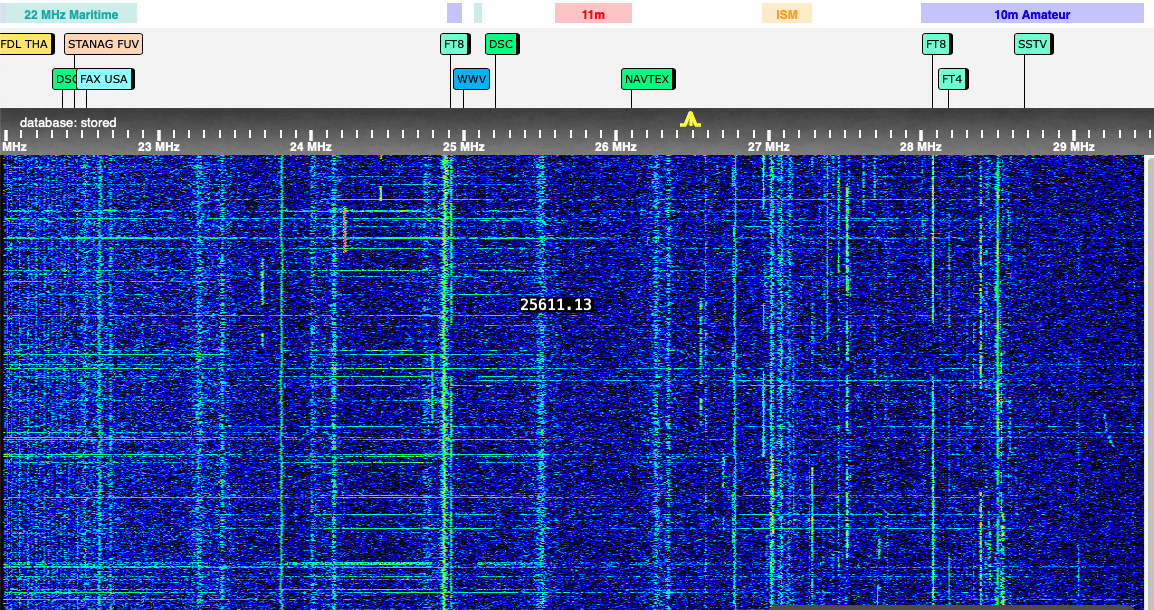
<p>AWWWW YEAH! I zoomed in and the carrier noise from before is gone. The part that is wild is that the noise floor is 1-2 dB off from where the KiwiSDR would be with no antenna attached!</p>

<p>After a little bit of browsing around the bands, this is a night and day change – I am now successfully picking up signals I could not have imagined picking up before since I’m in the low noise garage. I love this!</p>

<p>Someday soon I’ll have to consolidate all these notes so they make more sense to future readers, but I am finally happy with my KiwiSDR setup.</p>]]></content><author><name></name></author><category term="radio" /><category term="radio" /><summary type="html"><![CDATA[Ok! So I’ve powered up the noisy as heck wifi bridge but also plugged in the USB wifi adapter with a 8dB antenna attached. I’m going to try to get the adapter working from the comfort of inside the house then go power down everything attached to the ethernet, especially the bridge because it is VERY noisy in the environment even when it’s not plugged into anything but power.]]></summary></entry><entry><title type="html">KiwiSDR Project Part 3</title><link href="https://mikedanko.me/radio/2024/09/04/kiwisdr-project-pt3.html" rel="alternate" type="text/html" title="KiwiSDR Project Part 3" /><published>2024-09-04T00:00:00+00:00</published><updated>2024-09-04T00:00:00+00:00</updated><id>https://mikedanko.me/radio/2024/09/04/kiwisdr-project-pt3</id><content type="html" xml:base="https://mikedanko.me/radio/2024/09/04/kiwisdr-project-pt3.html"><![CDATA[<p>I find it helpful to write down things to help narrow down problems and facilitate my decision processes. A whole lot has happened with this setup. There is a lot of trial and error and once I’m happier with it, I’ll turn this into something more akin to a blog post.</p>

<p>Quick note: After a couple weeks of running, the fan has quieted down. I’m assuming there’s some sort of burrs or something that wear down after a lot of spins.</p>

<p>In other news, there have been ups, there have been downs. Reception in the room I’ve had it in in the house has been OK, but less than what I expect. I’ve seen FT8 spots as far as Australia and Asiatic Russia, but it’s not quite there yet. There have been some noise issues I still have to sort out. Inside there are noise sources that are somewhat tolerable. I figured between all the lights and electronics inside that this was going to be inevitable so I thought I’d move it to the detached garage where there is only a few bulbs and a garage door opener. Oh yeah, I also don’t like having a giant loop antenna in my bedroom.</p>

<p>The problem with moving to the detached garage is that it is very detached from the house. The KiwiSDR requires a wired ethernet connection. This left me with a few options for getting wired ethernet into the garage:</p>

<ul>
  <li>Find the conduit getting power to the garage and snake ethernet through it.</li>
  <li>Bury the ethernet from the house.</li>
  <li>Run an aerial ethernet line</li>
  <li>Powerline Networking</li>
  <li>Somehow get the Wifi into the garage and run a bridge to physical wiring.</li>
</ul>

<p>Which led to a bit of a decision process:</p>
<ul>
  <li>The previous residents have sealed over the conduit with remodeling and expanding foam. This could get really ugly really fast and it’s worth it.</li>
  <li>Burying an ethernet drop is probably a better longer term option here but there is a problem with lots and lots of concrete out back, completely encircling the house on that side and the garage.</li>
  <li>An aerial is problematic as there’s no good way to attach it to the garage safely due to some construction weirdness.</li>
  <li>Powerline networking was <em>very</em> tempting, but the adapters run on HF radio frequencies and the potential for interference would be high. Anecdotes on the Internet confirm this, but the costs on a pair of adapters for these (~$35 USD) might bring this into the realm of <em>something I may try</em> if I cannot solve other problems with the way I went.</li>
  <li><strong>This leaves me with the easiest option of getting the WiFi into the garage and bridging ethernet to the KiwiSDR</strong></li>
</ul>

<p>This ended up being easier said than done. There is a single 15 amp circuit going to the garage and two available outlets so I’m going to be using some sort of surge protector to be able to fit all the wall warts and power supplies.</p>

<p>Even though the indoor access point is only 20 feet or so from the back wall, there was little signal – even if I went out with a 8dB antenna attached to a external USB adapter. I was really hoping to just install a few debian packages, a USB Wifi adapter with the antenna and be able to call it a day, but of course that wasn’t going to happen. Realistically even if the signal was not <em>great</em> if I could get a megabit or two to the SDR it would be enough, but that didn’t happen.</p>

<p>Instead I settled on a pair of Wifi repeaters with Ethernet bridging. They’re marketed as a “mesh” product but they are anything but, they are repeaters as are the majority of the ones you can buy in a store. They aren’t bad as they are configurable in fun ways, like the one in the garage does not act as a repeater and instead is just an ethernet bridge, but one in the house is a repeater to get the signal to the one in the garage.</p>

<p>With all that done, I hooked up the antennas (loop and GPS), powered up the inserter for the loop, connected to the extender ethernet, and made sure all the connections were tight and the toroids were wound – but the noise was unbearable. I threw in a small ethernet switch between the wall adapter and the KiwiSDR but it was no help.</p>

<p>Next steps are to isolate noise sources that have to do with the setup. Isolating sources of noise <em>in</em> the garage was pretty easy since I can just unplug everything that isn’t part of the KiwiSDR setup.</p>

<p>Likely culprits (not in order):</p>
<ul>
  <li>The cheap Wifi bridge. I will attempt to disable the one in the garage and either run a very long temporary ethernet cable from the house to the SDR in it’s location or leave one of the indoor bridges on and configure an external USB Wifi adapter.</li>
  <li>It’s just too damn noisy and the RF I’m picking up is the actual state of the air in my part of Upper Arlington.</li>
  <li>Grounding in general. The whole setup is this mess of tiny wires and things that plug into a box and there’s no easy way to really have a common ground.</li>
  <li><del>Better filters on mains. There’s a number of reasons this could be gross out there. <em>Oh wow, I forgot I actually own a Furman Power Conditioner</em> and thought of this as I typed it. Ironically, it’s in an SKB rack that’s in the garage. I will more than likely just do this right away as it’s easy enough to do.</del> Did this. No effect.</li>
  <li>The noise is also inside, so I’ll see if it’s still present with the antenna disconnected or with my unpowered loop.</li>
</ul>

<p>My waterfall was covered with these odd carriers that were REALLY causing problems across ham bands, and well, all bands. I managed to find one of the loudest ones at 23.128MHz and went out with my portable TECSUN PL-880 with the antenna extended to find the culprits. I had the same noise on the portable so I just waved the antenna around like crazy until I could narrow it down a bit more.</p>

<p>I started with everything that wasn’t connected to the radio. Unplugged the antenna inserter. Still awful noise. Unplugged the ethernet from the Wifi bridge and SILENCE. Played around with it a bit more, unplugged the SDR from the ethernet hub but had the Wifi bridge plugged into it the screaming comes back. Whenever the link state is up on the ethernet port of the TP-Link bridge there is just screaming all across the HF bands.</p>

<p>If I unplug the Wifi bridge and just plug the KiwiSDR’s ethernet into a small ethernet switch I have out there, I get similar noise. I can’t win. There are ferrite chokes all over the place, but I’m pretty sure we’re just looking at awful power supplies on the networking gear which those won’t fix. In this case, the USB wifi might not be a bad option.</p>

<p>So at least I have some sort of idea where the noise is coming from at this point. I’ve done some preliminary looking around and maybe found an cheapish low noise ethernet switch that I can at least test and return tomorrow.</p>

<p>In hindsight this should have been a no brainer, the Extender/Bridge doesn’t even have a ground. I’ve taken all these precautions to ensure I had good power on the antenna and KiwiSDR and no amount of RF chokes or other filtering would fix the cheap networking gear power circuits. I really don’t want this thing in my bedroom permanently so I will continue to try and find other solutions.</p>

<p>Direct Wifi on the SDR sounds the simplest and I do have some higher gain antennas and USB adapters that support using them, so that might be a tomorrow/weekend project. If that doesn’t work, I have a RaspberryPi with a linear power supply that might also do the job.</p>

<p>The good news was that the noise levels are SUPER low when this stuff isn’t attached. The antennas and KiwiSDR themselves are stellar signal wise in that location.</p>]]></content><author><name></name></author><category term="radio" /><category term="radio" /><summary type="html"><![CDATA[I find it helpful to write down things to help narrow down problems and facilitate my decision processes. A whole lot has happened with this setup. There is a lot of trial and error and once I’m happier with it, I’ll turn this into something more akin to a blog post.]]></summary></entry><entry><title type="html">KiwiSDR Project Part 2</title><link href="https://mikedanko.me/radio/2024/08/24/kiwisdr-project-pt2.html" rel="alternate" type="text/html" title="KiwiSDR Project Part 2" /><published>2024-08-24T00:00:00+00:00</published><updated>2024-08-24T00:00:00+00:00</updated><id>https://mikedanko.me/radio/2024/08/24/kiwisdr-project-pt2</id><content type="html" xml:base="https://mikedanko.me/radio/2024/08/24/kiwisdr-project-pt2.html"><![CDATA[<p>It’s alive… and noisy. I’m already picking up WSPR reports and am reporting into <a href="https://pskreporter.info/pskmap.html?preset&amp;callsign=KD8ORQ&amp;mapCenter=35.42167819271155,-83.37994186583147,3.9325572880613575">pskreporter</a>. with some pretty good spots.</p>

<p>I do not have everything permanently mounted yet, but the magloop is in the KiwiSDR and it’s alive. I opted for a metal case for the SDR and it came with a VERY noisy fan which is going to necessitate it being removed from my room where it currently resides. I’m not talking RF noise, the fan is <strong>loud</strong>.</p>

<p>There’s some RF noise problems but it’s not bad at all.</p>

<p>The KiwiSDR v1 is a Beaglebone Black based linux box and it has interesting security to say the least as it’s really meant to be a plug and play radio more than anything else. Once I’m more comfortable with how that works I will be probably making use of the proxy service so everyone can use it.</p>

<p>Did I mention this thing is noisy?</p>]]></content><author><name></name></author><category term="radio" /><category term="radio" /><summary type="html"><![CDATA[It’s alive… and noisy. I’m already picking up WSPR reports and am reporting into pskreporter. with some pretty good spots.]]></summary></entry><entry><title type="html">KiwiSDR Project Part 1</title><link href="https://mikedanko.me/radio/2024/08/23/kiwisdr-project-pt1.html" rel="alternate" type="text/html" title="KiwiSDR Project Part 1" /><published>2024-08-23T00:00:00+00:00</published><updated>2024-08-23T00:00:00+00:00</updated><id>https://mikedanko.me/radio/2024/08/23/kiwisdr-project-pt1</id><content type="html" xml:base="https://mikedanko.me/radio/2024/08/23/kiwisdr-project-pt1.html"><![CDATA[<p>My KiwiSDR has been shelved for a while due to that I didn’t really have a great place to put it where I lived last. Now that I’m someplace I have a place to set it up, it’s time to get cracking on it.</p>

<p>I didn’t have all the parts at first to get it working, but I wanted to get something working so I threw together:</p>

<ul>
  <li><a href="https://www.rtl-sdr.com/youloop-portable-passive-loop-antenna-now-available-in-our-store/">YouLoop Portable Passive Loop</a></li>
  <li><a href="https://www.rtl-sdr.com/buy-rtl-sdr-dvb-t-dongles/">RTL-SDR Blog SDR</a></li>
  <li><a href="https://www.nooelec.com/store/ham-it-up.html">NoElec Ham It Up v1.3 HF UpConverter</a></li>
  <li><a href="https://www.rtl-sdr.com/rtl-sdr-com-broadcast-block-high-pass-filter-now-sale/">RTL-SDR Broadcast AM Block High Pass Filter</a></li>
  <li>RaspberryPi 4 8Gb (overkill, had it around) running <a href="https://www.openwebrx.de">OpenWebRx</a></li>
</ul>

<p>It really wasn’t very good for picking up anything but one or two very strong signals. Eventually due to matters of cable management I took the upconverter out of the system and put the SDR dongle into direct sampling mode. This has the side effect of disabling gain circuitry but I could honestly not tell a difference with the YouLoop attached.</p>

<p>I had been waiting on a replacement power supply to arrive for my <a href="https://www.w6lvp.com">W6LVP Receive Only Magloop</a> and it arrived today. As soon as I plugged the power supply into the power inserter the LED finally came on and I plugged into into the SDR instead of the YouLoop and…</p>

<p><img src="/assets/images/kiwisdr/Pasted image 20240823145412.png" alt="W6LVP Magloop on KiwiSDR" width="600" /></p>

<p>The difference was night and day. I am totally listening to crazy people on CB right now very loudly and clearly. The magloop is sitting on top of my laundry hamper inside right now and I’m sure it will only get better when I find more permanent home for it. I don’t mean for this to be a comparison between a $35 passive antenna and a significantly more expensive hand made active magloop, but I was just very excited to pull in some signals finally.</p>

<p>The RTL-SDR radio can only really capture 2 MHz or so of spectrum at a time and it’s not very detailed on the waterfall so I’m really looking forward to getting the KiwiSDR online at some point this evening, although it’s not assembled at all yet and that might take some time.</p>

<p>As you can see on the waterfall above it’s very noisy, but even with a ton of RF chokes on every cable, the Pi and RTL-SDR are pretty noisy. The power supply that I have for the KiwiSDR should help with some of these issues.</p>

<p>In the meantime, thrilled to be getting some signals!</p>]]></content><author><name></name></author><category term="radio" /><category term="radio" /><summary type="html"><![CDATA[My KiwiSDR has been shelved for a while due to that I didn’t really have a great place to put it where I lived last. Now that I’m someplace I have a place to set it up, it’s time to get cracking on it.]]></summary></entry><entry><title type="html">Abandoning Twitter</title><link href="https://mikedanko.me/general/2023/07/17/twitter-no-more.html" rel="alternate" type="text/html" title="Abandoning Twitter" /><published>2023-07-17T00:00:00+00:00</published><updated>2023-07-17T00:00:00+00:00</updated><id>https://mikedanko.me/general/2023/07/17/twitter-no-more</id><content type="html" xml:base="https://mikedanko.me/general/2023/07/17/twitter-no-more.html"><![CDATA[<p>As a fervent believer in the power of words and the magic they can weave, I’ve spent a significant portion of my digital life immersed in the world of social media. Among these platforms, Twitter has been a constant companion. From sharing bite-sized thoughts to engaging in enriching conversations, Twitter has been a playground for ideas and interactions. However, I have recently felt a shift in my perception of this platform, a change that has led me to make a decision - it is time for me to part ways with Twitter.</p>

<h5 id="why-leave-twitter">Why Leave Twitter?</h5>

<p>Over the years, Twitter has transformed tremendously. From being a platform where meaningful conversations were curated, it has morphed into an environment teeming with clamor and disarray. Despite the charm of its 280-character limit tweets, I have found it increasingly difficult to navigate through the incessant noise.</p>

<p>The word ‘noise’ might sound a tad harsh, but it is the most apt descriptor for what Twitter has become. It feels as though everyone is shouting over each other to be heard, with minimal room for nuanced dialogue. Scrolling through my feed has felt more like sifting through an unending tide of chaotic chatter rather than a well-curated collection of thoughts and ideas.</p>

<p>Another concern is Twitter’s interface, which I find increasingly difficult to use. What was once straightforward and simple has become a labyrinth of features, each vying for my attention, making it feel less like a social media platform and more like a digital battleground.</p>

<p>Lastly, Twitter has simply stopped being fun. The joy that I once derived from sharing thoughts, participating in discussions, or simply reading what others had to say has evaporated. It has turned into a chore rather than a leisure activity, signaling that it is time for me to move on.</p>

<h5 id="hello-mastodon">Hello, Mastodon</h5>

<p>In search of a more welcoming social media haven, I came across Mastodon. A decentralized, open-source alternative to Twitter, Mastodon provides a refreshing change from the turbulence of the mainstream platform. It promises a more controlled environment, with community-focused instances tailored to various interests.</p>

<p>One of the main reasons for my shift is that many people who share my hobbies have migrated to Mastodon. This migration has created an appealing ecosystem where like-minded people can share their interests without the disruptive noise that is often the hallmark of larger social media platforms. It feels more personal, more human, and definitely more fun.</p>

<p>The simplicity and user-friendly interface of Mastodon is another selling point. It is reminiscent of early Twitter days – easy to navigate, uncluttered, and focused on what matters most: communication and community.</p>

<h5 id="looking-forward">Looking Forward</h5>

<p>I am not advocating for everyone to abandon Twitter or claiming that Mastodon is a perfect haven. My decision stems from my personal experiences and the current dynamics of these platforms as they relate to me.</p>

<p>To those who continue to find Twitter valuable and enriching, I wish you all the best. As for me, I am eager to embark on this new journey with Mastodon, excited about the engaging and enriching interactions I anticipate having in this new space.</p>

<p>If you’re a friend, a follower, or someone who shares my interests, I invite you to join me over at Mastodon – you can find the link to the left. It’s not about choosing one platform over another, but rather finding the space where we can genuinely connect, converse, and cultivate our interests together. After all, isn’t that what social media should be about?</p>]]></content><author><name></name></author><category term="general" /><summary type="html"><![CDATA[As a fervent believer in the power of words and the magic they can weave, I’ve spent a significant portion of my digital life immersed in the world of social media. Among these platforms, Twitter has been a constant companion. From sharing bite-sized thoughts to engaging in enriching conversations, Twitter has been a playground for ideas and interactions. However, I have recently felt a shift in my perception of this platform, a change that has led me to make a decision - it is time for me to part ways with Twitter.]]></summary></entry></feed>